DIRECTION / NOT A RANDOM STYLE
City Folding prompts. Keep the street connected.
Name the surface that folds, the foreground that stays put and the camera that reveals it.
DIRECT YOUR CITY FOLD
Prompt studioChoose a reference photo and set the direction. Get a prompt to use with your chosen video tool.
Optional reference · JPG, PNG, WebP · up to 10 MB
Your photo stays in this tab. It is not uploaded or included in the saved prompt. This prepares a prompt; it does not render a video.
01
What should a City Folding prompt describe?
A City Folding prompt should identify the near pavement that stays flat, the connected distant road and buildings that bend, and one camera direction. Describe a continuous architectural transformation rather than a collapse or camera roll. This independent studio assembles direction text from your choices. The prompt starters are untested and need a real rendering service before you can judge their effect.
02
An actual prompt-studio interaction
Checked in the browser on October 9, 2026. We selected a public concept still, chose Keep my scene / Locked camera / 9:16, built the direction and saved the text. The concept still was used to exercise the picker; it is not a newly rendered result or a camera photograph.
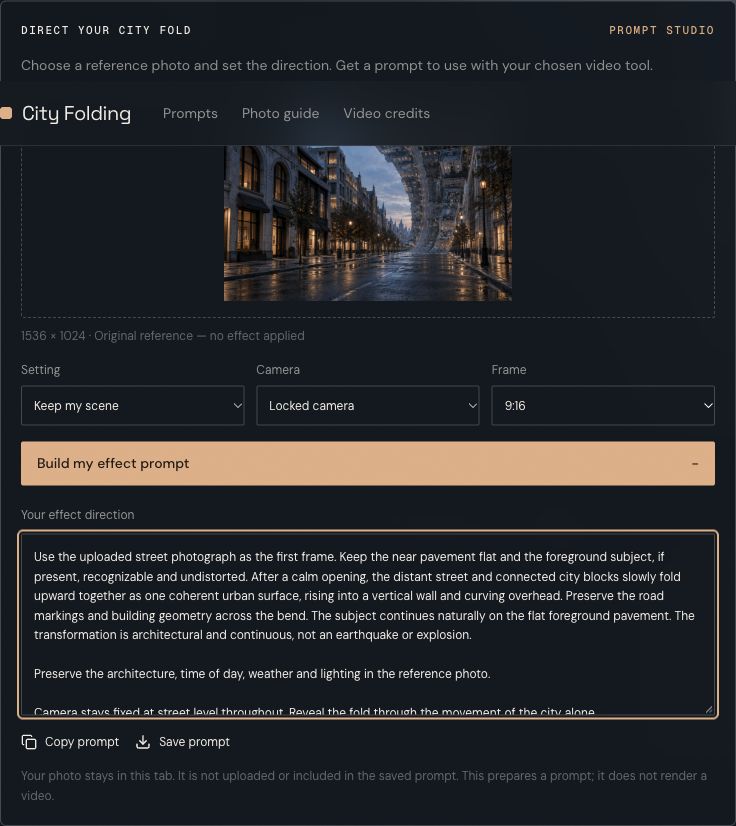
Local reference and saved prompt
The visible controls and text export are the current product. The image remains a local reference, and saving the prompt does not include the image or its filename. Open the exact downloaded prompt.
Open media fileBrowser check and asset provenance03
City Folding direction starters
Original, untested prompts. Copy a direction and adapt it to your authorized source in the rendering service you choose.
Begin with the visible geometry
Empty avenue · locked camera
Use the street reference as the opening frame. Keep the near avenue flat and the camera fixed. The distant road and adjoining building blocks bend upward as one connected surface, then curve overhead. Preserve connected road markings; no rubble, camera roll or abrupt cut.
Daylight street · slow approach
Continue the daylight and architectural materials in the reference. The camera approaches slowly at street level while the distant city bends overhead. Keep near curbs stable and the connected buildings recognizable. No independent spinning towers or earthquake.
Blue-hour skyline · fixed viewpoint
Keep the reference street under restrained blue-hour light. Hold the near pavement and viewpoint steady as the connected distant skyline folds upward. Continue the street perspective through the bend. Do not add captions, text or new foreground objects.
04
The geometry is the effect.
Ask the connected street and its buildings to move together. A row of isolated towers rotating independently reads like a different effect.
A stable foreground provides a reference point. Keep the closest pavement flat and protect the subject’s face, outfit and feet if someone is present.
Avoid competing instructions such as an earthquake, collapsing buildings or a spinning camera. These can replace the deliberate fold with general visual chaos.
The studio combines your setting and camera choice into one direction. It does not predict a model’s output or upload your photo.
05
Before the skyline moves.
What is the City Folding effect?
A street begins normally, then distant roads and buildings bend upward and over the scene. Keeping a person or the near pavement stable makes the impossible architecture readable. This site helps prepare a directed prompt for that visual effect.
Does this site generate a video today?
No. This release lets you select a local reference, choose scene and camera directions, then copy or save a prompt. Video rendering is not connected. The hero image is original concept artwork, not a video result.
Which photo should I use?
Use a wide street scene with visible pavement, building edges and space above the skyline. If a person is present, keep their whole body in frame. A tight face-only selfie gives the fold little architecture to work with.
Is my photo uploaded?
No. It is decoded in the current browser tab for reference review. Copying or saving the prompt does not include your photo or its filename. Removing the photo or reloading clears it.
Will the prompt guarantee the same effect?
No. A prompt expresses a target; each video model may interpret the geometry differently. Check that the foreground stays stable, streets remain connected and buildings fold rather than melt. Review actual output before sharing.
Is City Folding a separate AI model?
It is an effect name, rather than a model offered by this site. Pollo has a dedicated effect page; general image-to-video models are a separate route that needs testing for this shot.
06
Adapt the direction to the renderer
The planner’s avoid clause becomes ordinary text. A separate service may offer a dedicated negative-prompt field, use a fixed template or interpret the direction differently. Check its actual inputs before submitting.
Use the camera guide for viewpoint choices and the troubleshooting guide to review the full moving result. If you need a different kind of task, compare folding with video outpainting.
Give the city a different horizon.
Prepare the photo and direct the bend.
07
See the planning examples
The reference-image gallery and browser check show the visual planning criteria, current local controls and an exact downloaded prompt.